Linux Workshop
Hello everyone! I'm Richa Patil. Today (10th July) Linux Workshop (day-1) was conducted by our alumnus Mr Pranav Jambare Sir who is currently working as a DevOps engineer at TCS.
In today's session, we learned some basic knowledge about Linux which includes the following:-
Linux Introduction :
Operating system :
An operating system is a program that, after being initially loaded into a computer by a boot program, manages all of the other application programs in a computer.
It is software that performs all the basic tasks.
It works as an interface between a computer user and computer hardware.
Some of the Benefits of Linux include:
Free and Reliable
Open source
Low-level resource support
Secure and perfect for programmers
Better community support
and many more...
Linux Evolution :
1. 1969 -> Unix developed by AT&T.
2. 1973 -> Unix rewritten in C.
3. 1974 -> Unix was released for educational purposes.
4. 1975-79 -> 6th & 7th edition.
5. 1983 -> System V accepted as standard OS.
6. 1987 -> SCO reported record distribution of Xenix.
7. 1990 -> UnixWare developed.
8. 1993 -> Berkeley stopped further Unix development.
9. 1996 -> Over 20+ distributions.
Linux Architecture :
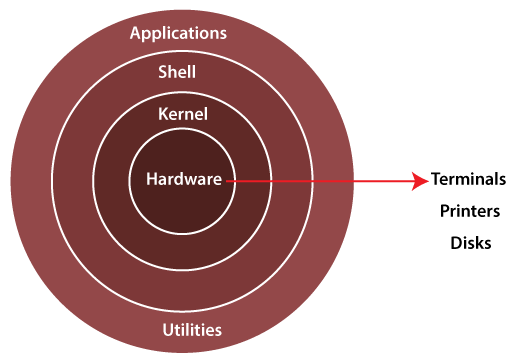
Hardware: Linux operating system contains a hardware layer that consists of several peripheral devices like CPU, HDD, and RAM.
Kernel: It is called the heart of Linux. It is used as an interpreter between hardware and shell. If the kernel gets crashed, indirectly Linux system will also crash.
Shell: It is a terminal used for running commands. The currently used shell is the bash shell.
Linux file hierarchy:
/ - include multiple directories.
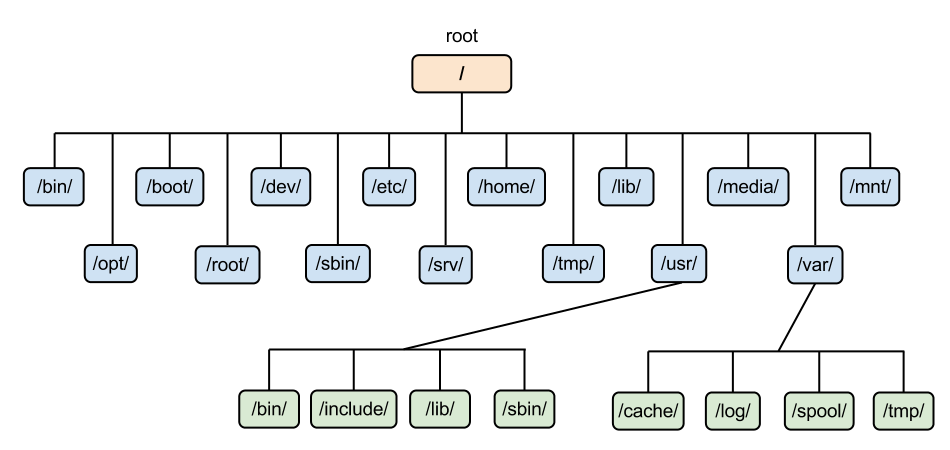
/boot/ - booting configurations.
/bin/ - binary files.
/dev/ - device-related things.
/etc/ - configuration files.
/home/ - users home directory.
/lib/- to run binaries libraries [/lib/].
/media/ - used for storing photos and videos.
/mnt/ - used for temporary mounting.
/opt/ - optional data is stored.
/root/ - administrative user created by the system.
/sbin/ - system-related binaries.
/tmp/ - temporary files stored until reboot.
/usr/ - user-related information.
/var/ - variable files are stored. It includes four directories: /cache/, /log/, /spool/ and /tmp/.
/srv/ - server-related files are stored.
Yanking:
/<word> -> to find a specific word.
yy -> to copy
p -> to paste
dd -> to delete
cc -> to go to insert state
gg -> to go to the beginning of the file
G -> to go to the end of the file
:<number> -> to go to a specific line in the file
:set nu -> to set the number of lines
:!<command> -> to operate a command while in the insert state
:%s/xyz/abc -> to replace the current word[xyz] with a new word[abc], here it only replaces every first word from every sentence.
:%s/xyz/abc/g -> to replace every given word with a new word from every sentence.
Redirection:
find / -user <username>: It is used to search for directories owned by a specific user.
find / -user <username>2><errorfile>: It is used to store the error generated in that specific file.
find / -user <username><outputfile>: It is used to show output on the screen.
find / -user <username><outputfile>2><errorfile>: It is used to store errors in a specific file and show output on the screen.
find / -user <username>&>/dev/null: It is used not to show the output or error generated on the screen.
find / -user <username> | tee <filename>: It is used to save the output to both terminal and a file.
Modes:
Esc mode: Escape mode is used to get out of the insert mode.
I mode: Insert mode is used to edit the given file.
:wq! mode: It is used to save and quit forcefully.
v mode: It is called visual mode.
These were the topics covered on the first day of our Linux workshop.
Thank You!